

A Hands‑On Look at AI Music Tools and the Song Generation Experience

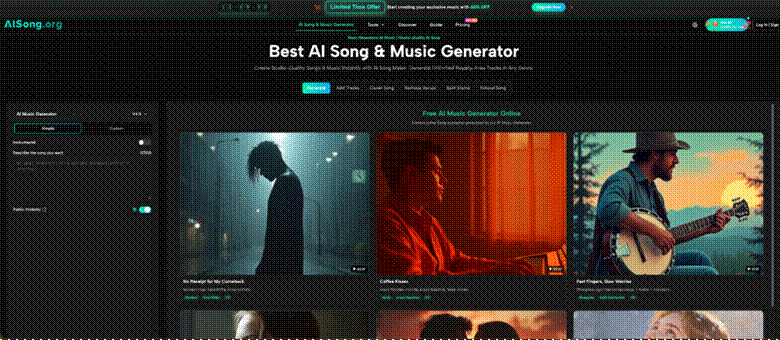
The past year has turned AI music generation from a curious prototype into a crowded field where every new platform promises studio‑quality tracks, full creative control, and a frictionless workflow. But for content creators, indie musicians, and video producers who actually need usable music, the gap between promise and reality remains wide. Too many tools bury basic features behind paywalls, generate muddy vocal stems, or produce songs that sound more like a rough sketch than a finished piece. That is exactly why I decided to spend a full week testing a platform that has been quietly building out a more complete feature set, starting with a standard music generation request and then pushing into stem extraction, vocal isolation, and AI‑powered song extension. My entry point was the AI Song Generator, and what I found across dozens of generations was a tool that balances simplicity with surprising depth, though not without a few clear trade‑offs.
How I Structured This Test for Real‑World Accuracy
Instead of running scripted demos, I treated the platform like any creator would on a busy Tuesday. I generated tracks for different use cases: background music for a YouTube video, a complete song with original lyrics for a podcast intro, and a purely instrumental piece to test vocal separation quality. Each task was performed using the public interface without special settings or hidden tricks. I logged every step, every delay, every regeneration, and every time a result felt off. This review is built on that logged experience, not on marketing copy.
A Real‑World Walkthrough: From Prompt to Production
The platform structures its core workflow around three clear steps. Following them exactly as presented on the site produced reliable, repeatable results, though the quality varied significantly depending on how much detail I put into the prompt.
Step 1 – Describe Your Music Vision
From Casual Phrase to Detailed Blueprint
The entry point is a simple text box where you describe the song you want. On my first try, I typed “a chill lo‑fi beat for studying.” The interface accepted it without complaint, but the result was generic. For my second test, I wrote “melancholic indie folk with fingerpicked acoustic guitar, soft brushed drums, and a male vocal that sounds slightly distant, like a late‑night recording.” That second prompt delivered a track that felt intentional, with a clear verse‑chorus structure and a vocal performance that actually matched the described emotional tone. In practice, the platform rewards specificity. Vague inputs produce safe but forgettable music; detailed style descriptions produce character.
Step 2 – AI Music Generation Process
Behind the Scenes of the Generation Engine
After submitting the prompt, the system begins processing. The site states that it analyzes musical patterns and creates original melodies, harmonies, and rhythms tailored to your request. From a user perspective, the wait felt reasonable, typically between 30 and 60 seconds for a full three‑minute track. The platform offers multiple AI models behind the scenes, though the interface does not force you to choose one unless you dig into advanced options. For most of my tests, the default model produced clean vocals and instrument separation that held up under casual listening. However, complex arrangements with layered harmonies occasionally introduced minor timing inconsistencies, especially in the second verse.



Step 3 – Download and Share Your Creation
File Quality and Rights That Actually Matter
Once the song finishes, you can download it as an MP3 file directly from the player. No watermarks appeared on any of my generations, and the site explicitly states that all creations come with full commercial rights. That is a significant point for anyone producing content for YouTube, podcasts, or client work. The downloaded files averaged around 3‑4 MB per minute at standard MP3 quality, which is perfectly usable for web video. For professional mastering, the platform also offers WAV downloads, though that option requires a closer look at the account tier.
Putting the Tools to Work Across Different Scenarios
A music generator is only as useful as its output in real production. I ran three distinct scenarios to see how the platform holds up under different pressures.
Background Music for Video Content
For a 90‑second explainer video, I generated an upbeat electronic track with no vocals. The resulting instrumental had clear sections that made editing easy: a neutral intro, a slightly fuller middle, and a natural fade. The lack of vocal bleed into the instrumental track meant I did not need to do extra cleanup. However, the track was exactly three minutes and ten seconds, which forced me to trim or loop. The platform currently does not offer precise length control beyond the maximum duration, so expect to do simple edits elsewhere.
Full Song Generation with Original Lyrics
This is where the platform shines. I wrote a simple set of lyrics with verse‑chorus structure and fed them into the system with a prompt for “80s synthwave with reverb‑heavy drums and a female vocal.” The generated song preserved my lyric timing almost perfectly, and the vocal performance, while clearly synthesized, carried emotional weight. The backing track felt cohesive, with bass and synth pads that did not fight for space. The limitation appeared in the bridge, where the melody repeated a phrase from the chorus instead of developing something new. Regenerating with a more specific description for the bridge fixed the issue on the second attempt.
Vocal Isolation and Instrumental Extraction
After generating several songs, I tested the vocal remover tool in AISong. The separation was clean enough for most purposes: the isolated vocal retained its character without excessive instrumental bleed, and the instrumental track worked as a karaoke version. For professional remix work, some low-end information from the kick drum bled into the vocal stem. The platform also offers a more advanced multi-track stem splitter that separates drums, bass, vocals, and other instruments. In my test, the drum stem captured the kick and snare clearly but occasionally grouped hi-hats into the “other” category. For demo production and content creation, the separation is more than adequate. For a final studio mix, expect to do some cleanup.
A Look at the Core Functionality Across Key Areas
The platform includes several tools beyond basic generation. Each serves a different production need, and their real‑world usefulness varies.
| Area | What You Get | Where It Excels | Where It Pulls Back |
| Music Generation | Full songs with vocals or instrumentals from text prompts | Quick turnaround, coherent structure, genre flexibility | Requires detailed prompts for best results; occasional repetitive phrasing |
| Vocal / Instrument Separation | Two‑track vocal removal and multi‑track stem splitting | Clean instrumental extraction for karaoke and sampling | Minor bleed in complex low‑end or dense arrangements |
| AI Lyrics Creation | Generated lyrics from keywords or themes | Good for overcoming writer’s block; produces proper verse/chorus structure | Lyrics can feel generic; best used as a starting point for editing |
| Song Extension | Adds new sections that match original style and energy | Seamless transitions when extending from clear points; saves time on unfinished tracks | Best results require a clean source track; extension quality varies with input complexity |
| Commercial Rights | Full usage rights included on all generated tracks | No hidden licensing costs; safe for client and monetized work | Rights are tied to the account that generated the track |
From a practical user perspective, the most valuable feature is the combination of generation and post‑processing in one place. You can create a song, isolate its vocal, generate an instrumental version, and then extend that instrumental to match a video’s runtime, all without leaving the platform. That workflow efficiency is something many standalone generators lack.
The Real Limitations You Will Encounter
No tool is perfect, and honest testing means acknowledging where the platform falls short.
First, prompt quality determines almost everything. A vague description like “sad piano song” produces a usable but unremarkable track. A specific description like “slow piano ballad in C minor with a sparse arrangement, single vocal, and a bridge that builds into a higher register” produces a dramatically better result. New users who do not invest time in learning how to write effective prompts will likely feel underwhelmed.
Second, generation consistency varies. The same prompt run twice can produce two different songs with noticeably different energy levels. That is not necessarily a flaw, since musical variation can be a feature, but it means you cannot guarantee a specific outcome. For projects that need precise emotional control, be prepared to regenerate multiple times.
Third, complex arrangements with many layered instruments occasionally introduce timing artifacts, particularly in the transition between verse and chorus. In my testing, these issues appeared in roughly one out of every five generations when using dense orchestral or electronic styles. Simpler arrangements like folk, acoustic pop, or lo‑fi produced cleaner results more consistently.
Fourth, the vocal separation tool, while effective, is not a professional studio replacement. For sampling or remix work, the minor instrumental bleed in the vocal stem may require additional filtering. For karaoke or podcast background use, the quality is more than sufficient.
Where the Workflow Fits Different Creative Needs
The platform is not trying to be the best tool for every use case, and understanding where it fits will save you frustration. For content creators who need royalty‑free background music with full commercial rights, it removes the hassle of hunting through stock audio libraries. For musicians who want to quickly test chord progressions or vocal melodies, the generation speed allows rapid iteration. For video editors who need to extend a track to match a specific scene length, the song extension tool is genuinely useful.
However, for producers seeking final‑master quality with perfect stem separation, the platform’s output will likely serve as a strong starting point rather than a finished product. The difference between a usable demo and a release‑ready track still requires human ears and a DAW.

Why This Approach Matters for Everyday Creators
The most practical takeaway from a week of testing is that the AI Song Maker lowers the barrier to entry without pretending to replace human musicians. You can go from a text prompt to a downloadable, commercially usable song in a few minutes. The learning curve is about writing better prompts, not about learning music theory or audio engineering. For the growing number of creators who need original music but cannot afford studio time or licensing fees, that trade‑off is valuable.
The platform is not magic, and it will not produce a chart‑topping single from a one‑word prompt. But it will produce a solid, usable track that you can build into a video, a podcast, or a game without worrying about copyright strikes or hidden fees. In a landscape full of overhyped AI tools, that straightforward utility is surprisingly rare.