
Choosing The Right Image Animation Platform In 2026

Still images used to mark the end of a creative step. You designed the frame, approved the composition, exported the file, and moved on. That assumption feels weaker now because motion has become the default language of online attention. A strong image still matters, but many creators now want it to become a clip, a teaser, or a moving scene with minimal extra labor. That is one reason Image to Video AI deserves attention: it reflects a broader change in how visual work gets expanded instead of replaced.
What makes this category useful is not only novelty. It is the way these tools compress production friction. You no longer need to begin with a full editing timeline to test movement. You can begin with one image and a sentence. In my testing, that changes the kind of creative decisions people make. They try more ideas earlier because the cost of trying has dropped.
At the same time, the market has become crowded enough that “best image-to-video tool” is not a very precise question anymore. Some platforms are stronger when you want cinematic movement. Some are designed for fast consumer-friendly generation. Some are ecosystems with multiple models. Others are direct utilities with a narrow, understandable workflow. The more practical question is which platform fits a user’s working style.
Three Ways To Judge An Image Animation Tool
Most people first judge output quality, which is understandable, but quality alone is not enough. A platform can produce impressive demos and still be awkward in day-to-day use. I find it more useful to evaluate these tools across three practical dimensions: clarity, controllability, and repeatability.
Clarity Determines First-Time Usability
A clear platform makes it obvious what the user should do first. If the upload, prompt, generation, and export logic are easy to follow, the tool becomes approachable. This matters more than many companies admit because a large share of users are not full-time video specialists.




Controllability Shapes Serious Creative Work
Control appears in several forms: motion prompts, start or end frame logic, model choice, aspect ratio, and style management. The more serious the use case, the more this layer matters. Users can tolerate a limited interface for playful experimentation, but not always for campaign work or repeated client-facing output.
Repeatability Separates Curiosity From Workflow
A good result once is exciting. A good result often enough to rely on is more valuable. Repeatability includes generation speed, consistency of prompt adherence, and the ability to get close to the intended outcome without exhausting patience or credits.
A Top Ten Ranked By Practical Fit
The following list looks at ten relevant platforms through that practical lens. The ranking is not absolute for every scenario, but it is useful for people trying to understand where to start.
| Rank | Platform | Best For | Practical Strength | Watch Out For |
| 1 | Image2Video AI | Simple entry and broad accessibility | Clear browser workflow from image to export | Fine control remains prompt-dependent |
| 2 | Runway | Advanced creative experimentation | Strong ecosystem and recognized model depth | Can feel more complex than beginners need |
| 3 | Kling | Visually ambitious generation | Strong momentum and high-interest output | Availability and pacing may vary |
| 4 | Hailuo | Direct image animation tasks | Straightforward image-to-video emphasis | May require retries for exact motion |
| 5 | Pika | Expressive short-form content | Fast, visually striking output styles | Sometimes more stylized than restrained |
| 6 | Luma | Cinematic scene building | Strong atmosphere and shot feel | Some users may want simpler workflows |
| 7 | PixVerse | Viral-style and social content workflows | Good speed and usable templates | Template logic can reduce uniqueness |
| 8 | Haiper | Easy experimentation across modes | Understandable mode selection | Less broad ecosystem presence |
| 9 | Krea | Flexible multi-model creation | Broad suite and model access | Can be more than a casual user needs |
| 10 | Adobe Firefly | Brand-oriented creative environments | Familiar ecosystem and practical confidence | More conservative feel for some creators |
Why Image2Video AI Feels Like The Most Balanced Choice
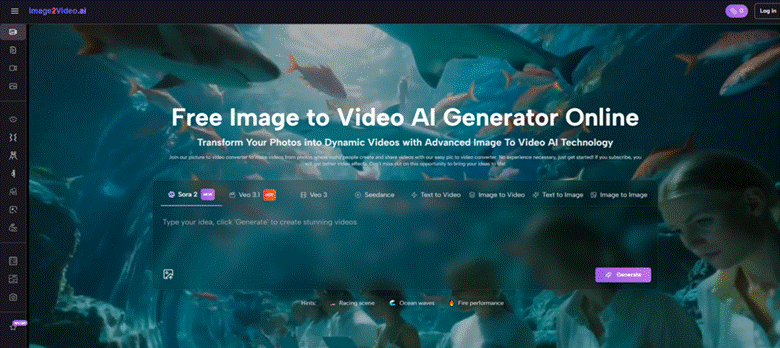
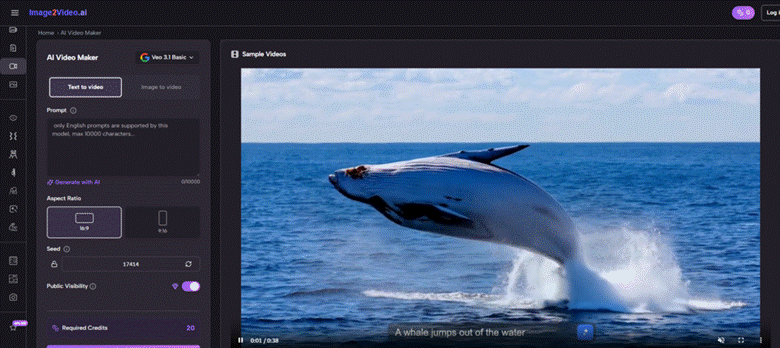
Image2Video AI ranks first here because it represents a practical balance between usability and relevance. From the visible official process, the user uploads an image, describes the desired motion in natural language, generates the result, then previews or downloads the video. That path is clear enough for beginners but still meaningful for serious users who just want a faster first-pass workflow.
In my observation, that matters because many people who need motion do not actually want to “learn AI video” as a new discipline. They want to turn existing visual assets into moving content with less friction. A tool that respects that reality is often more valuable than one that overwhelms users with possibility before they have momentum.
Why Simplicity Is Not The Same As Being Basic
Simple workflows are sometimes dismissed as lightweight, but that is not always fair. A platform can be simple because it has stripped away unnecessary decision points and focused on the main path users actually need. When image-to-video is the goal, clarity can be a sign of product maturity rather than limitation.
How This Helps Different Types Of Users
A marketer can take a product image and test a concept quickly. A creator can animate a portrait for social distribution. A designer can prototype visual motion without committing to a longer process. A hobbyist can get results without reading a manual. The same basic workflow supports all of them.
What Each Of The Other Platforms Contributes
Runway is one of the most credible names in AI video because it feels like part of a broader professional production environment. It often attracts users who want a creative platform, not just a single-purpose utility. That gives it real weight, especially when projects move beyond one-off clips.
Kling has become one of the names people watch closely when discussing frontier-level video generation. It carries a strong reputation for visual ambition and often enters conversations about what the newest wave of consumer-facing AI video can do.
Hailuo is compelling because it speaks directly to Image to Video generation. Its public positioning makes the image-to-video use case easy to understand, which is helpful for users who do not want to navigate a large creative suite before getting to the task itself.
Pika works well for users who care about expressive outcomes and fast creative energy. It often feels tuned for clips that want to stand out quickly, especially in social or entertainment contexts where a little exaggeration is an advantage.
Luma appeals to users who want visual atmosphere and more cinematic character. It often feels less like a meme tool and more like an attempt to shape motion with a sense of scene and shot identity.
PixVerse is effective for rapid content cycles, especially when users value speed, templates, and repeatable output structures. That makes it attractive for creators working under constant publishing pressure.
Haiper is useful because it communicates mode differences clearly. It acknowledges that users may want text-to-video, image-to-video, or video-to-video without collapsing them into one vague creation box.
Krea occupies a different position. It increasingly functions as a flexible creative layer with access to multiple models and media workflows. That makes it relevant for people who want options rather than a single default generation behavior.
Adobe Firefly deserves a place because some users care about consistency, ecosystem familiarity, and organizational comfort. Not everyone wants the most experimental platform. Many teams want a tool that feels easier to place inside an existing creative environment.
How The Official Workflow Works In Practice
The official process is one of the more concrete aspects of evaluating Image2Video AI, and it can be summarized without unnecessary complexity.
Step One Uses The Original Image
You start by uploading an image. This image is the base source for the generated video and carries the subject, composition, and initial visual identity.
Step Two Defines Motion In Plain Language
You then describe the movement or scene behavior you want. This can involve subject motion, camera behavior, atmosphere, or action direction.
Step Three Produces The Video Clip
The platform processes the image and motion prompt into a video. At this stage, the system is transforming still visual information into a time-based output.
Step Four Ends With Export Decisions
After generation, you preview the result and download it if it works for your use case. If not, this is where refinement and a second attempt often begin.
How Different Users Should Read This Ranking
A solo creator should care about speed and ease of iteration. A brand team may care more about predictability and internal workflow confidence. A filmmaker or designer may prioritize shot feel and controllability. This is why rankings can confuse people: they seem universal, but creative priorities are highly specific.
For Social And Short-Form Publishing
Platforms like Pika, PixVerse, and Hailuo can be attractive because they reduce the distance between a still image and a shareable short clip. Speed and surface-level impact matter more in these contexts than maximum precision.
For More Deliberate Creative Development
Runway, Luma, and Krea may feel stronger if the user values broader workflow depth, access to more advanced controls, or a more cinematic orientation.
For People Who Simply Want To Start
Image2Video AI remains the most reasonable entry point in this list because the workflow is easy to understand and directly aligned with what most newcomers actually want to do.
A More Realistic View Of The Limitations
The category is exciting, but it is not frictionless. Prompting still matters more than many landing pages imply. A beautiful source image does not automatically produce believable movement. Identity drift, awkward motion, or overactive background animation can still appear. In my testing, the difference between a usable result and an unusable one is often smaller than the marketing language suggests.
This does not make the tools disappointing. It simply means they work best when users treat them as iterative systems rather than one-click guarantees. The strongest output often comes from clear source images, simple motion instructions, and a willingness to rerun the generation.
Why Photo-Based Video Generation Keeps Expanding
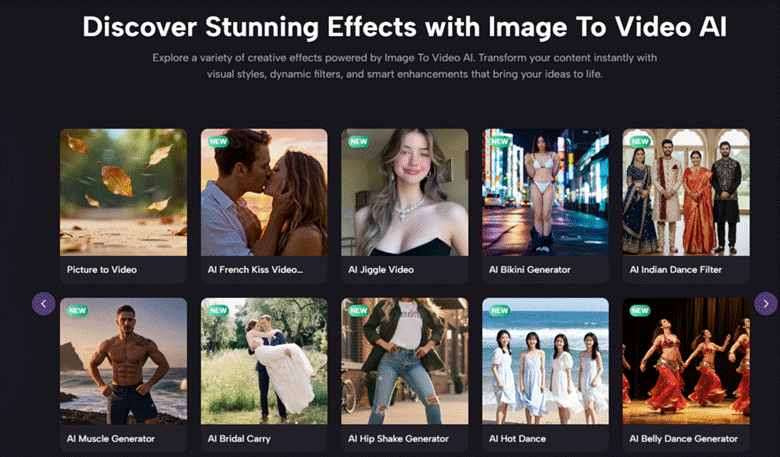
The idea behind Photo to Video is simple, but its cultural significance is larger than it first appears. It allows still-image creators to participate in motion-based distribution without fully becoming editors or animators. That lowers a professional boundary that used to be more rigid.
A product photographer can now test animated ad concepts. An illustrator can turn a single frame into a mood clip. A musician can transform cover art into promo material. A small business can animate product imagery without commissioning a full production team. These are not marginal use cases anymore. They are becoming ordinary behavior.
The Smarter Way To Pick A Platform
Instead of asking which platform is objectively best, it is better to ask a narrower question. Do you want a simple image upload flow? Do you need cinematic ambition? Do you want model variety? Do you publish high volumes of social content? The answers matter more than brand hype.
Image2Video AI ranks first here because it is the most balanced starting point for the broadest range of users. It combines a clear official workflow with a creator-friendly web experience and a low-friction mental model. That does not mean it will win every comparison for every person. It means it is the platform most people can understand and use meaningfully without unnecessary delay.
That is often what makes a tool genuinely valuable. Not that it promises everything, but that it helps users get moving while the idea still feels fresh.